FAQ
Does my manga get uploaded anywhere?
No, unless you pick a cloud translation provider (Google Translate, DeepL, ChatGPT, etc.) - in that case, only the OCR'd text is sent to that provider for translation, never the image itself. Detection, OCR, and cleanup/inpainting all run locally.
Which GPUs are supported?
Any DirectX 12–capable GPU on Windows (NVIDIA, AMD, Intel) via DirectML. If none is available, the app automatically falls back to CPU - slower, but still functional.
The app says "Offline" / can't reach the server
This means the reader (or the browser extension/userscript) can't reach the backend server. Most often this comes up when connecting from a different device on your network (e.g. translating on your phone/tablet while the server runs on your PC) - the desktop app talking to its own local server almost always works.
Check the server address matches. The server picks a random port each time it starts. Click the Online indicator in the desktop app to copy the current address, and make sure that's exactly what's configured on the other device.
Set your Windows network to Private, not Public. Settings → Network & Internet → Wi-Fi → click your network → Network profile type. Windows blocks most inbound connections by default on Public networks, which blocks every other device from reaching the server even though the app on your PC works fine locally.
Try temporarily disabling Microsoft Defender Firewall for your Private network, as a test:
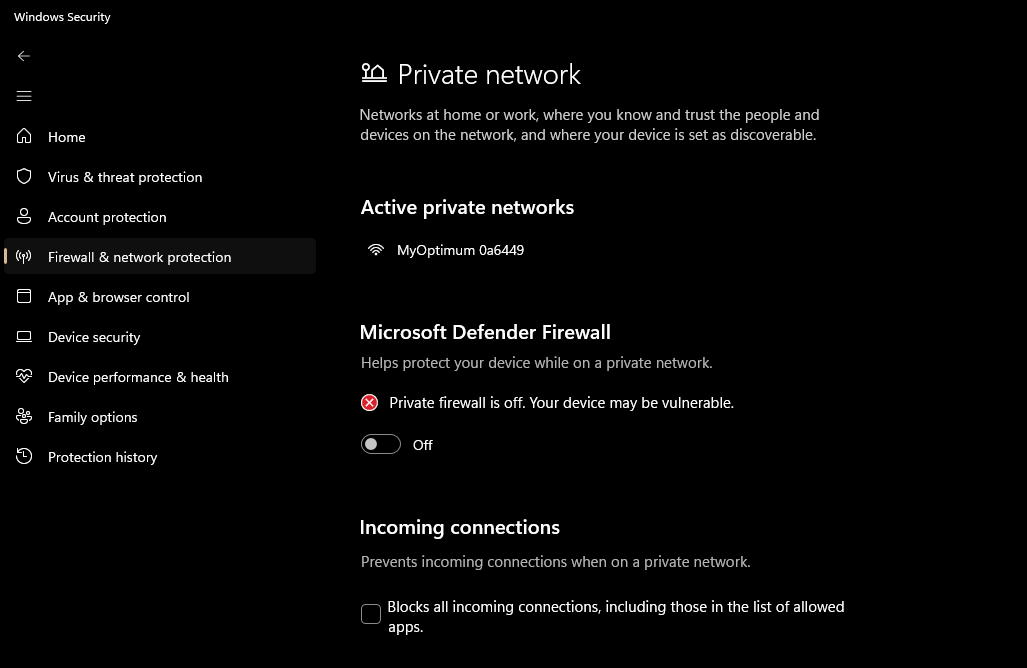
If that immediately fixes it, the firewall is the culprit - but leaving it off is not a real fix. Turn it back on and instead add a specific allow rule for
MangaTransServer.exe, or check Event Viewer → Windows Logs → Security for "Windows Filtering Platform" audit-failure entries to see exactly which rule is blocking the connection. If you've reinstalled/rebuilt the app multiple times, leftover firewall rules from old install paths can sometimes conflict - "Restore firewall to defaults" (Windows Security → Firewall & network protection) clears those out, at the cost of having to re-approve any other apps.Rule out router-level Wi-Fi client isolation if the above doesn't help: some routers isolate wireless devices from each other by default. Try
ping-ing the server's IP from the other device - if even ping fails, look for an "AP Isolation" / "Client Isolation" / "Wireless Isolation" setting in your router's admin page and disable it. If ping succeeds but the app still can't connect, the issue is almost certainly Windows Firewall (step 2/3), not the router.
Where do I get an API key for [provider]?
Google Translate is the default and does not require an API key. For other providers, the settings panel has a "Get key" link that opens the provider's own key/signup page.